# OpenProject系統設定

建議「自訂工作項目版面」

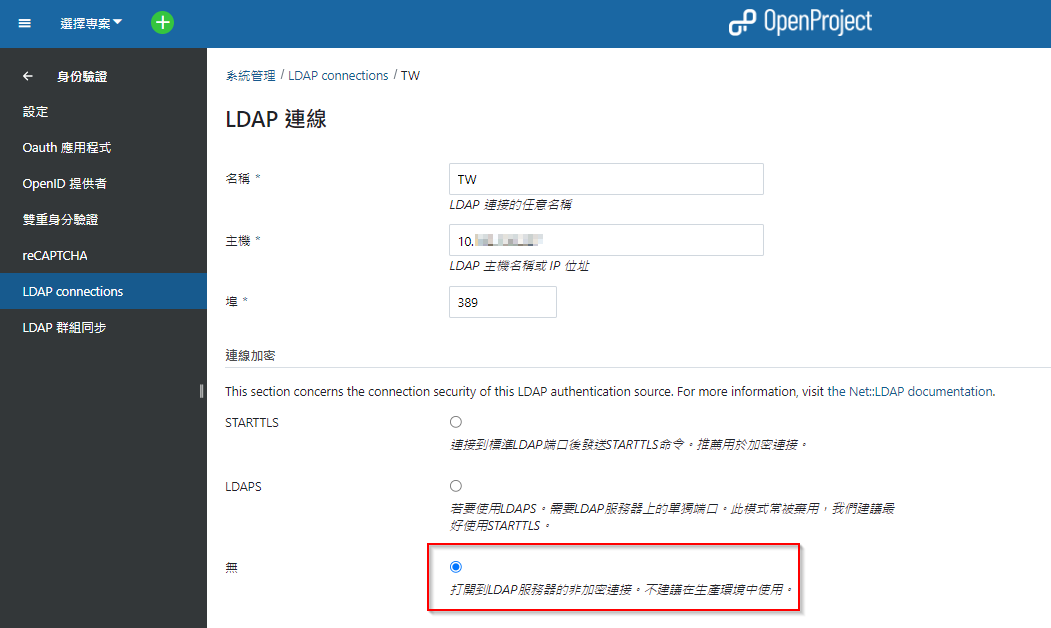
# 連線到M$網域主控站

好像沒甚麼要注意的，非常簡單

<p class="callout info">請詳細參考官方網站  
[Documentation](https://www.openproject.org/docs/) -&gt;[System admin guide](https://www.openproject.org/docs/system-admin-guide/) -&gt; [Authentication](https://www.openproject.org/docs/system-admin-guide/authentication/) -&gt; [LDAP authentication](https://www.openproject.org/docs/system-admin-guide/authentication/ldap-authentication/)</p>

[![image.png](https://book.kafeiou.pw/uploads/images/gallery/2024-02/scaled-1680-/14uimage.png)](https://book.kafeiou.pw/uploads/images/gallery/2024-02/14uimage.png)

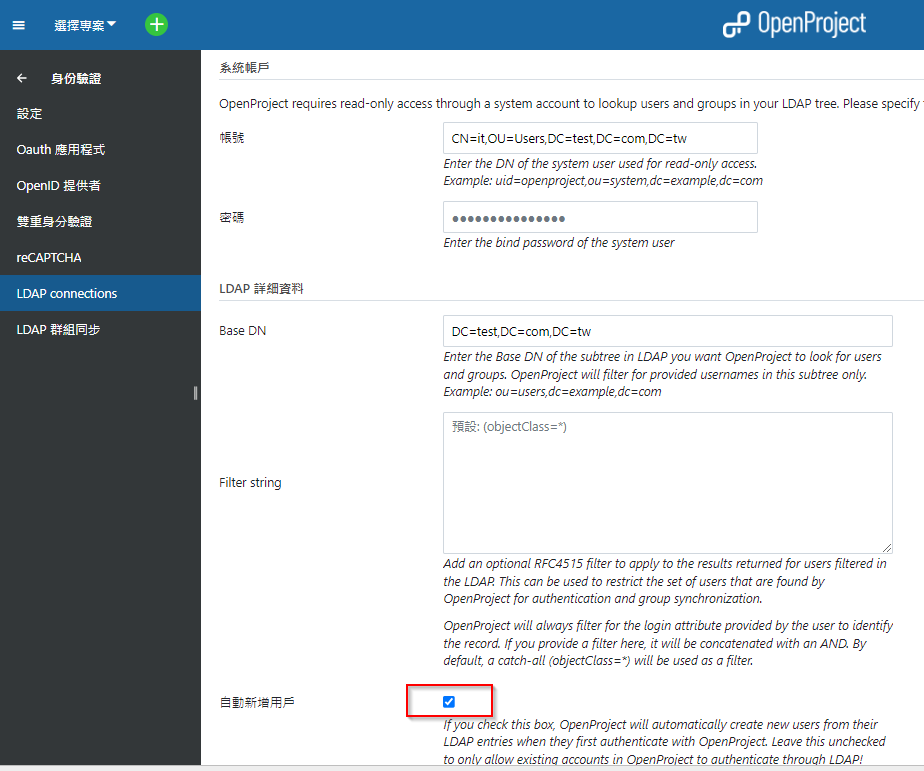
<p class="callout info">系統帳戶建用權限最小的，最好只能唯讀之類的; Base DN 建議要精準一點，不要範圍過大</p>

[![image.png](https://book.kafeiou.pw/uploads/images/gallery/2024-02/scaled-1680-/Ghzimage.png)](https://book.kafeiou.pw/uploads/images/gallery/2024-02/Ghzimage.png)

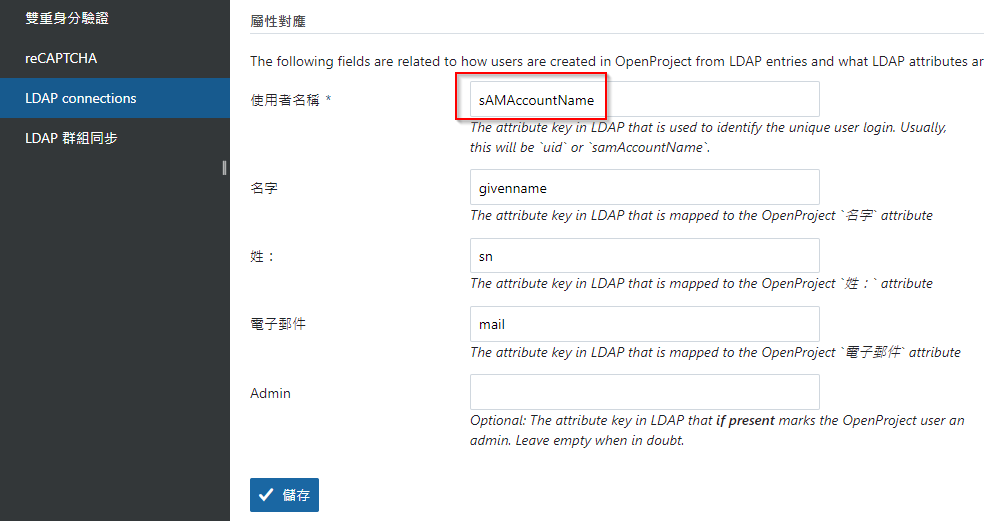
<span style="color: rgb(224, 62, 45);">**sAMAccountName**</span>

##### [![image.png](https://book.kafeiou.pw/uploads/images/gallery/2024-02/scaled-1680-/image.png)](https://book.kafeiou.pw/uploads/images/gallery/2024-02/image.png)  
  
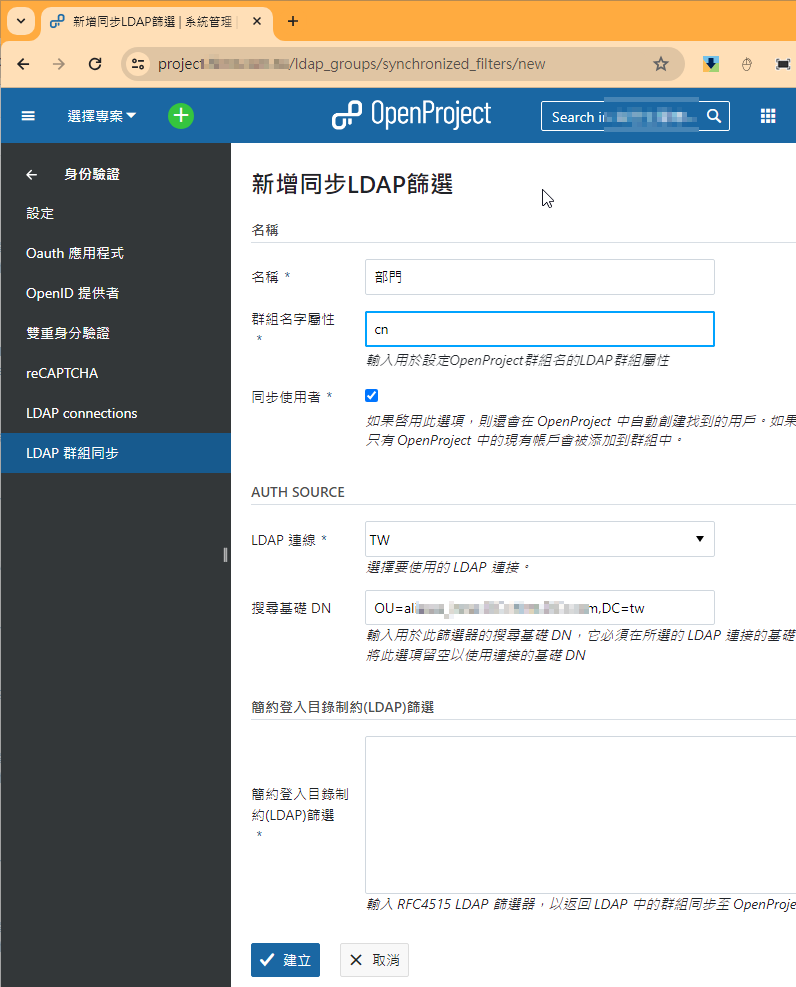
**<span style="color: rgb(224, 62, 45);">設定群組</span>**

<p class="callout info"><span style="color: #e03e2d;">**設定群組可以在新增工作項目時，指定整個群組，非常好用**</span></p>

[![image.png](https://book.kafeiou.pw/uploads/images/gallery/2024-02/scaled-1680-/TZcimage.png)](https://book.kafeiou.pw/uploads/images/gallery/2024-02/TZcimage.png)

# 整合GIT、SVN的「修訂記錄」

<p class="callout info">目標(Objectives)：工作項目(Bug)達到Issue Tracking功能。</p>

<p class="callout success">成效(Key Result)：與svn、git整合，程式提交時，OpenProject就能自動對應修正工作項目。  
</p>

##### <span style="color: rgb(224, 62, 45);"> **GIT**</span>

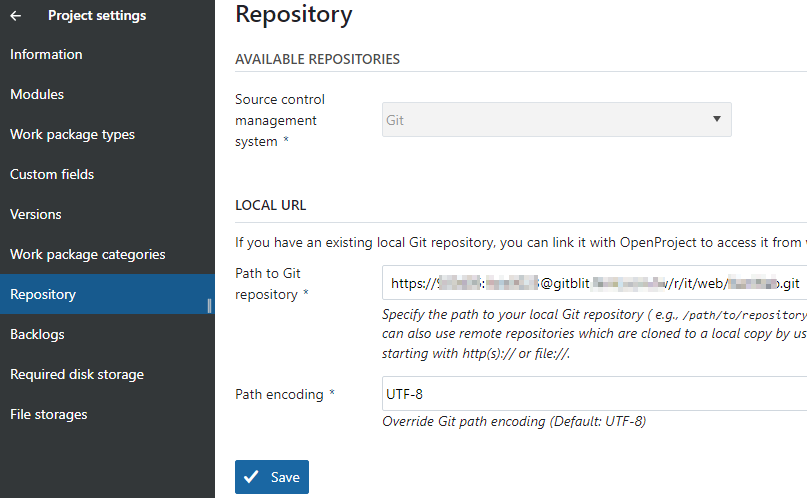
<p class="callout info"><span style="background-color: rgb(248, 248, 248);">Git服務器(非Github)，我推薦使用</span>[gitblit](ttps://www.gitblit.com)<span style="background-color: rgb(248, 248, 248);"> ， 原因很多，主要是OpenProject說只能與local git,整合 , 實際上我用 </span><span style="color: rgb(224, 62, 45);">**<span style="color: rgb(0, 0, 0);">https://</span>account:password@gitserver** </span><span style="background-color: rgb(248, 248, 248);">方式可以連上，真的不錯。</span></p>


[![image.png](https://book.kafeiou.pw/uploads/images/gallery/2024-02/scaled-1680-/OQCimage.png)](https://book.kafeiou.pw/uploads/images/gallery/2024-02/OQCimage.png)

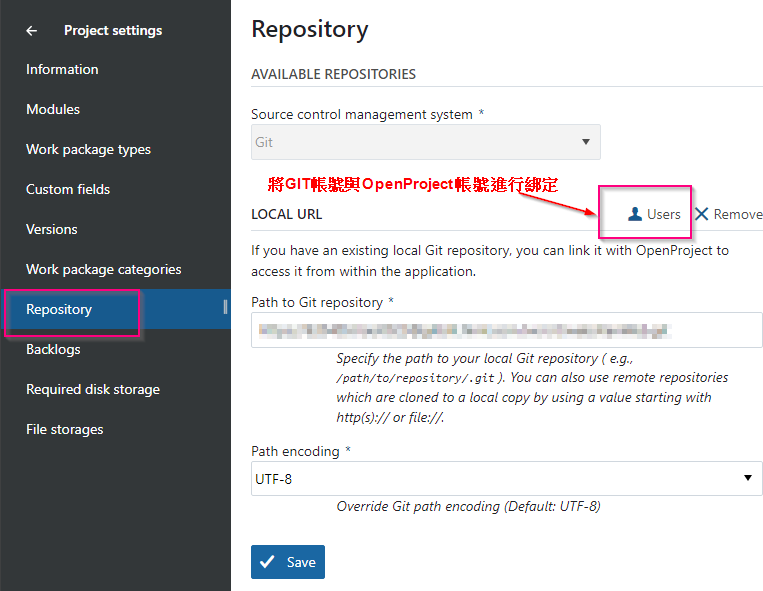
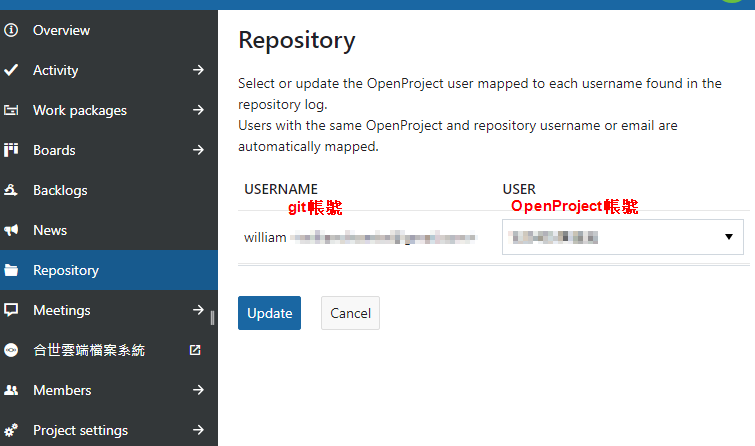
<p class="callout info">另外設定GIT成功，記得將git開發者與OpenProject成員帳號進行綁定</p>

[![image.png](https://book.kafeiou.pw/uploads/images/gallery/2024-02/scaled-1680-/aAuimage.png)](https://book.kafeiou.pw/uploads/images/gallery/2024-02/aAuimage.png)

[![image.png](https://book.kafeiou.pw/uploads/images/gallery/2024-02/scaled-1680-/j4kimage.png)](https://book.kafeiou.pw/uploads/images/gallery/2024-02/j4kimage.png)
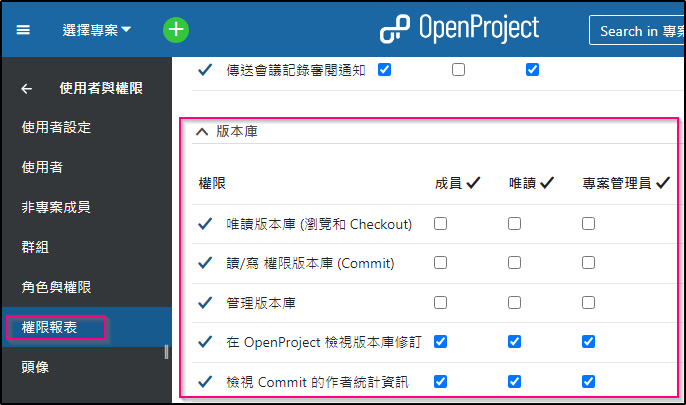
#### **<span style="color: rgb(224, 62, 45);">建議更改設定讓所有人(含專案管理員)只能看到修訂歷史紀錄</span>**

<p class="callout info">**只讓系統管理員才能管理版本庫**</p>

[![image.png](https://book.kafeiou.pw/uploads/images/gallery/2024-03/scaled-1680-/iboimage.png)](https://book.kafeiou.pw/uploads/images/gallery/2024-03/iboimage.png)

[![image.png](https://book.kafeiou.pw/uploads/images/gallery/2024-03/scaled-1680-/oBnimage.png)](https://book.kafeiou.pw/uploads/images/gallery/2024-03/oBnimage.png)
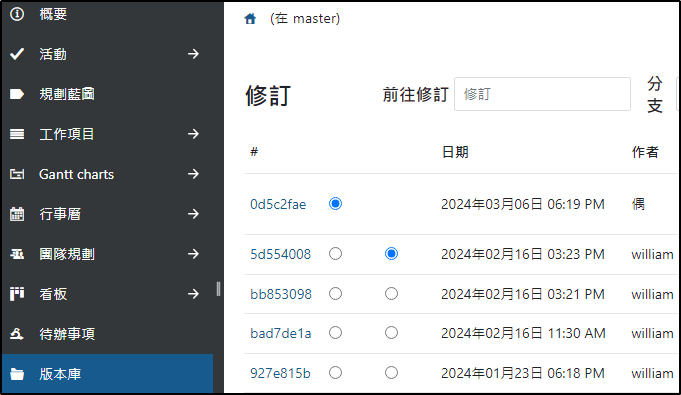
# 版控系統提交時，輸入關鍵字與專案管理系統整合

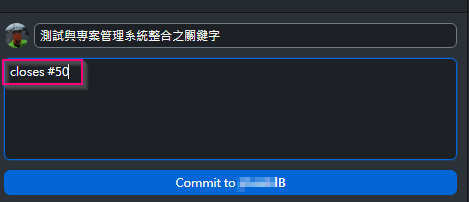
<p class="callout info">當我們在版本控管系統題交訊息時，可以輸入關鍵字，就可以跟專案管理系統整合。</p>

<span style="color: rgb(224, 62, 45);">**GIT提交**</span>

[![image.png](https://book.kafeiou.pw/uploads/images/gallery/2024-02/scaled-1680-/PNbimage.png)](https://book.kafeiou.pw/uploads/images/gallery/2024-02/PNbimage.png)

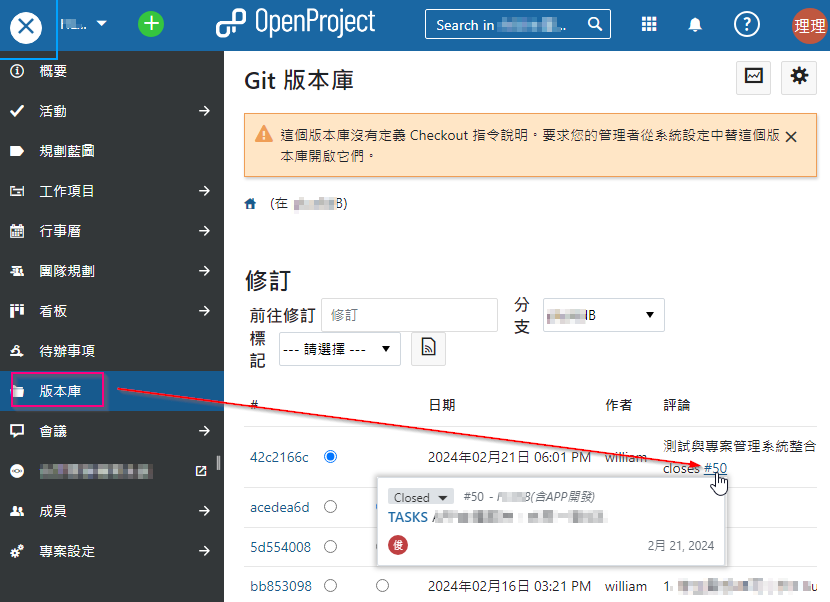
**<span style="color: rgb(224, 62, 45);">OpenProject整合版本庫</span>**

[![image.png](https://book.kafeiou.pw/uploads/images/gallery/2024-02/scaled-1680-/rfCimage.png)](https://book.kafeiou.pw/uploads/images/gallery/2024-02/rfCimage.png)

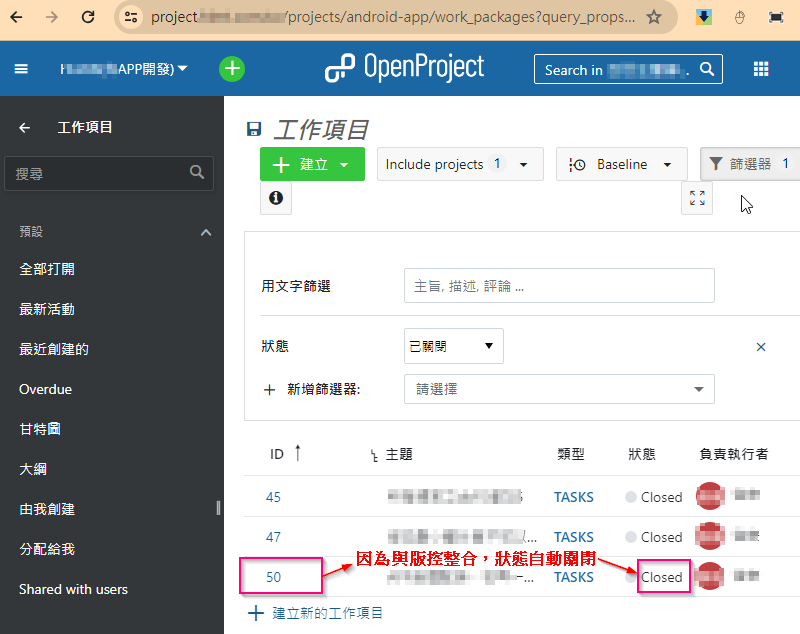
**<span style="color: rgb(224, 62, 45);">對應到工作項目 #50 自動關閉</span>**

[![image.png](https://book.kafeiou.pw/uploads/images/gallery/2024-02/scaled-1680-/E9Limage.png)](https://book.kafeiou.pw/uploads/images/gallery/2024-02/E9Limage.png)

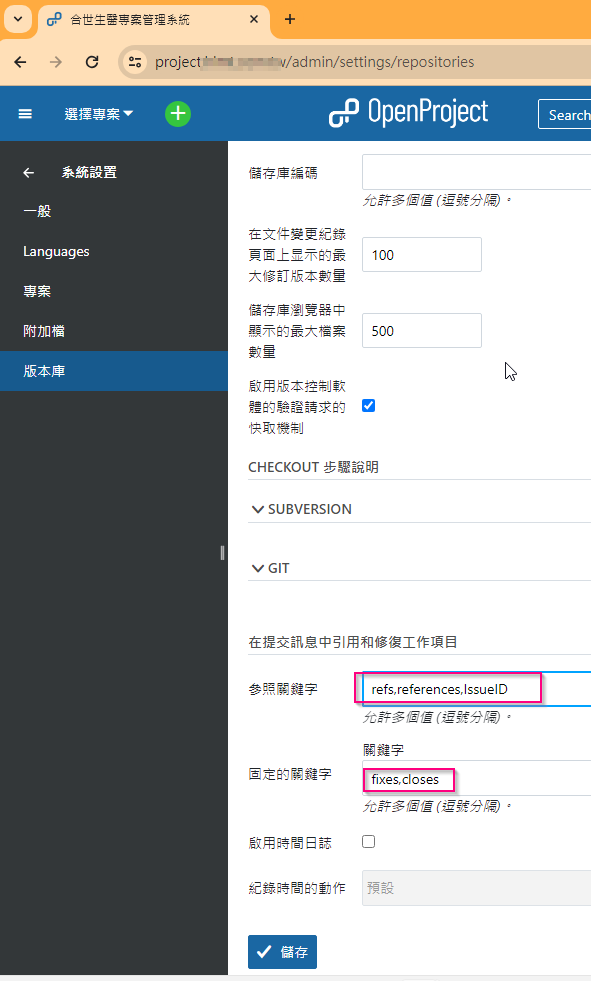
#### <span style="color: rgb(224, 62, 45);">**關鍵字是可以自定的**</span>

[![image.png](https://book.kafeiou.pw/uploads/images/gallery/2024-02/scaled-1680-/SE1image.png)](https://book.kafeiou.pw/uploads/images/gallery/2024-02/SE1image.png)