# 透過M$ Excel(2016)同步更新工作進度

##### <span style="color: rgb(224, 62, 45);">**官方提供透過excel，就可以很簡易的更新工作進度**</span>

步驟如下：

1\. 取得自己的API token  
請注意這個API token只能有一個，新增後只顯靈一次，就算通靈也不會再次顯示出來，需自己保存。

[![image.png](https://book.kafeiou.pw/uploads/images/gallery/2024-02/scaled-1680-/QOPimage.png)](https://book.kafeiou.pw/uploads/images/gallery/2024-02/QOPimage.png)

[![image.png](https://book.kafeiou.pw/uploads/images/gallery/2024-02/scaled-1680-/Be7image.png)](https://book.kafeiou.pw/uploads/images/gallery/2024-02/Be7image.png)

2\. 到官方提供的[GitHub OpenProjectExcel ](https://github.com/opf/OpenProjectExcel)下載excel巨集檔案

[![image.png](https://book.kafeiou.pw/uploads/images/gallery/2024-02/scaled-1680-/cmyimage.png)](https://book.kafeiou.pw/uploads/images/gallery/2024-02/cmyimage.png)

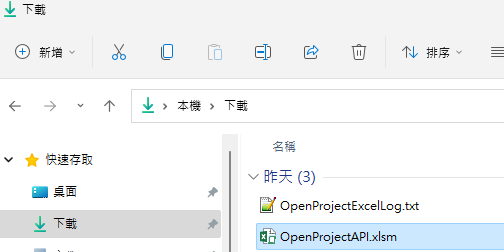
<p class="callout info">**下載的檔案解開後會找到OpenProjectAPI.xlsm巨集檔案** </p>

[![image.png](https://book.kafeiou.pw/uploads/images/gallery/2024-02/scaled-1680-/o5aimage.png)](https://book.kafeiou.pw/uploads/images/gallery/2024-02/o5aimage.png)  
  
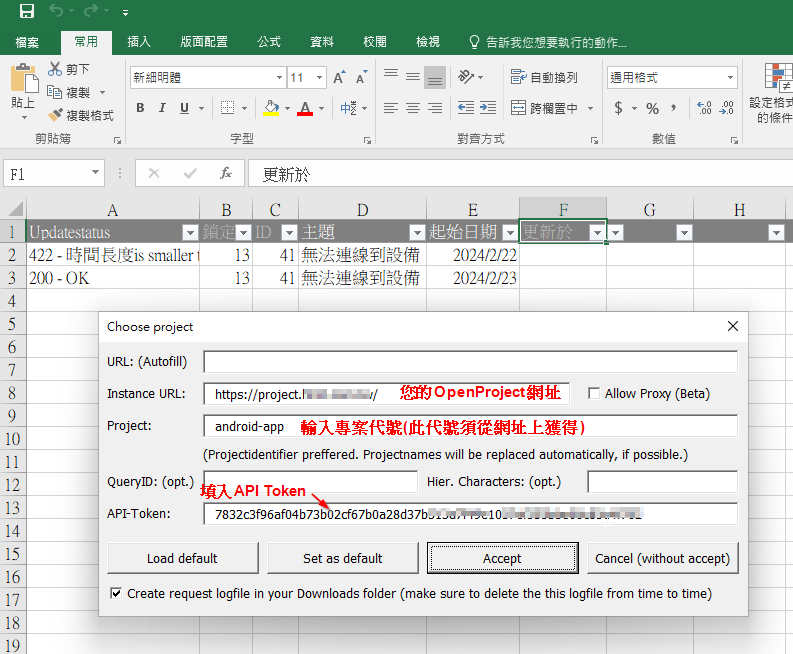
3\. 開啟Excel檔案，並且設定參數

[![image.png](https://book.kafeiou.pw/uploads/images/gallery/2024-02/scaled-1680-/xvIimage.png)](https://book.kafeiou.pw/uploads/images/gallery/2024-02/xvIimage.png)

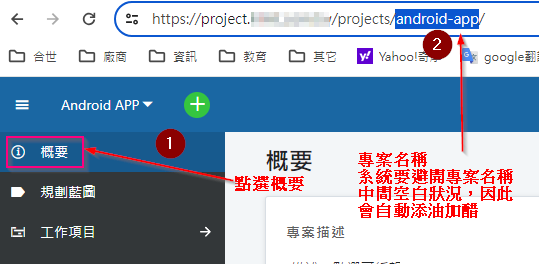
<p class="callout info">從網址獲得專案名稱(代號)</p>

[![image.png](https://book.kafeiou.pw/uploads/images/gallery/2024-02/scaled-1680-/PSbimage.png)](https://book.kafeiou.pw/uploads/images/gallery/2024-02/PSbimage.png)


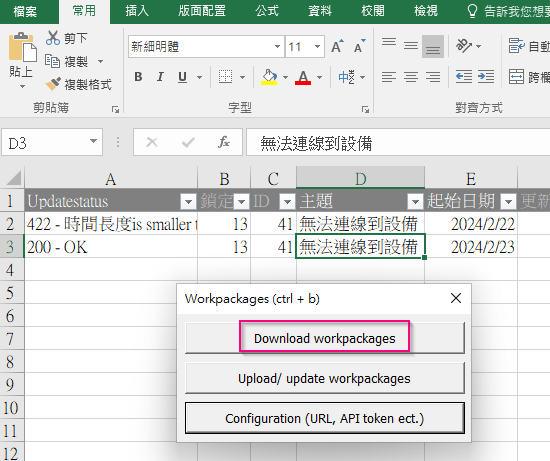
4\. 開始同步資料  
選擇Download或Upload/update，就可以使用了

[![image.png](https://book.kafeiou.pw/uploads/images/gallery/2024-02/scaled-1680-/4YXimage.png)](https://book.kafeiou.pw/uploads/images/gallery/2024-02/4YXimage.png)

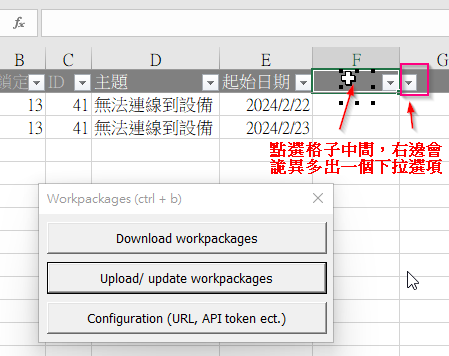
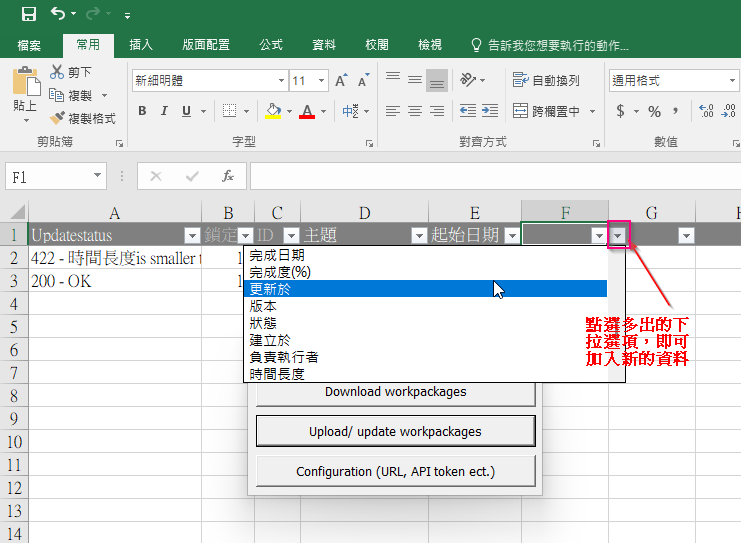
5\. 若沒有看到其他欄位，需自行手動加上去

[![image.png](https://book.kafeiou.pw/uploads/images/gallery/2024-02/scaled-1680-/QaQimage.png)](https://book.kafeiou.pw/uploads/images/gallery/2024-02/QaQimage.png)

[![image.png](https://book.kafeiou.pw/uploads/images/gallery/2024-02/scaled-1680-/PNSimage.png)](https://book.kafeiou.pw/uploads/images/gallery/2024-02/PNSimage.png)
<p class="callout success">[詳參閱官網](https://www.openproject.org/docs/system-admin-guide/integrations/excel-synchronization/)</p>